In this tutorial, we will add multiple boxes to the scene. This tutorial assumes that you have successfully understood the basics of how to create an actor using the scene object. If not, u may want to review the previous tutorials as a refresher. Ok so now lets get started. There are a lot of things similar between this and the previous tutorial on the simple box. In fact, the only thing changed when we need to add multiple boxes is the InitializePhysX function. In addition, we need to store the references to the boxes into a vector so we create a new vector.
This InitializePhysX function is given as follows,
We are repeating the same steps as we did in the last tutorial. We first initialize the PhysX library and its extensions. Next we create the scene object and then we create a static ground plane rigidbody.
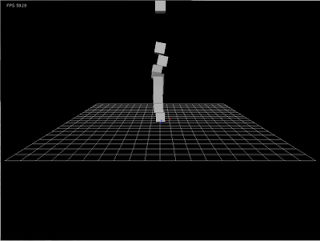
In the above lines, we loop 10 times. We generate a new y position using the loop variable and then assign this position to the global pose of the current actor. In the previous PhysX release, we would create a new actor and give it the same descriptor. Now we have to create a new actor with new transform. Next we call the addActor function to create a new object for us.
Rendering of multiple boxes
In PhysX3, the rendering of objects has greatly been simplified. Since at the time of creation of our rigid bodies, we stored them into a vector. We use that vector for rendering. The RenderActors function and the other related functions are implemented as follows,
The only difference between this RenderActor function and the one in the previous
tutorial is that this function loops over all of the rigid bodies. That's it. The rest of the code remains the same since it will loop through all of the actors and determine their types to call the appropriate draw function as detailed in the last tutorial.
Running the code gives us the following output.
Source code of this tutorial
#include <vector>
vector <PxRigidActor*> boxes;
This InitializePhysX function is given as follows,
void InitializePhysX() {
 gPhysicsSDK = PxCreatePhysics(PX_PHYSICS_VERSION, gDefaultAllocatorCallback, gDefaultErrorCallback, PxTolerancesScale() );
if(gPhysicsSDK == NULL) {
  cerr<<"Error creating PhysX device."<<endl;
  cerr<<"Exiting..."<<endl;
  exit(1);
 }
 if(!PxInitExtensions(*gPhysicsSDK))
    cerr<< "PxInitExtensions failed!"<<endl;


 //Create the scene
 PxSceneDesc sceneDesc(gPhysicsSDK-> getTolerancesScale());
 sceneDesc.gravity=PxVec3(0.0f, -9.8f, 0.0f);
 if(!sceneDesc.cpuDispatcher) {
   PxDefaultCpuDispatcher* mCpuDispatcher = PxDefaultCpuDispatcherCreate(1);
   if(!mCpuDispatcher)
      cerr<<"PxDefaultCpuDispatcherCreate failed!"<<endl;
      sceneDesc.cpuDispatcher = mCpuDispatcher;
   }
   if(!sceneDesc.filterShader)
      sceneDesc.filterShader  = gDefaultFilterShader;

   gScene = gPhysicsSDK->createScene(sceneDesc);
   if (!gScene)
       cerr<<"createScene failed!"<<endl;
 gScene->setVisualizationParameter(PxVisualizationParameter::eSCALE,     1.0);
 gScene->setVisualizationParameter(PxVisualizationParameter::eCOLLISION_SHAPES, 1.0f);
PxMaterial* mMaterial = gPhysicsSDK->createMaterial(0.5,0.5,0.5);

//Create actors
//1) Create ground plane
PxReal d = 0.0f;
PxTransform pose = PxTransform(PxVec3(0.0f, 0, 0.0f),PxQuat(PxHalfPi, PxVec3(0.0f, 0.0f, 1.0f)));
PxRigidStatic* plane = gPhysicsSDK->createRigidStatic(pose);
if (!plane)
   cerr<<"create plane failed!"<<endl;

PxShape* shape = plane->createShape(PxPlaneGeometry(), *mMaterial);
if (!shape)
   cerr<<"create shape failed!"<<endl;
gScene->addActor(*plane);
We are repeating the same steps as we did in the last tutorial. We first initialize the PhysX library and its extensions. Next we create the scene object and then we create a static ground plane rigidbody.
//2) Create cube
PxReal density = 1.0f;
PxTransform transform(PxVec3(0.0f, 5.0, 0.0f), PxQuat::createIdentity());
PxVec3 dimensions(0.5,0.5,0.5);
PxBoxGeometry geometry(dimensions);
for(int i=0;i<10;i++) {
 transform.p  = PxVec3(0.0f,5.0f+5*i,0.0f);
PxRigidDynamic *actor = PxCreateDynamic(*gPhysicsSDK, transform, geometry, *mMaterial, density);
 if (!actor)
   cerr<<"create actor failed!"<<endl;
 actor->setAngularDamping(0.75);
 actor->setLinearVelocity(PxVec3(0,0,0));
 gScene->addActor(*actor);
 boxes.push_back(actor);
}
}
In the above lines, we loop 10 times. We generate a new y position using the loop variable and then assign this position to the global pose of the current actor. In the previous PhysX release, we would create a new actor and give it the same descriptor. Now we have to create a new actor with new transform. Next we call the addActor function to create a new object for us.
Rendering of multiple boxes
In PhysX3, the rendering of objects has greatly been simplified. Since at the time of creation of our rigid bodies, we stored them into a vector. We use that vector for rendering. The RenderActors function and the other related functions are implemented as follows,
void RenderActors()  {
  // Render all the actors in the scene
  for(int i=0;i<boxes.size();i++ ) {
    DrawActor(boxes[i]);
  }
}
void DrawBox(PxShape* pShape) {
  PxTransform pT = PxShapeExt::getGlobalPose(*pShape);
  PxBoxGeometry bg;
  pShape->getBoxGeometry(bg);
  PxMat33 m = PxMat33Legacy(pT.q );
  float mat[16];
  getColumnMajor(m,pT.p, mat);
  glPushMatrix();
     glMultMatrixf(mat);
  glutSolidCube(bg.halfExtents.x*2);
  glPopMatrix();
}
void DrawShape(PxShape* shape)  {
  PxGeometryType::Enum type = shape->getGeometryType();
  switch(type)
  {
     case PxGeometryType::eBOX:
 DrawBox(shape);
 break;
  }
}

void DrawActor(PxRigidActor* actor)  {
  PxU32 nShapes = actor->getNbShapes();
  PxShape** shapes=new PxShape*[nShapes];
  actor->getShapes(shapes, nShapes);
  while (nShapes--)
  {
     DrawShape(shapes[nShapes]);
  }
  delete [] shapes;
}
The only difference between this RenderActor function and the one in the previous
tutorial is that this function loops over all of the rigid bodies. That's it. The rest of the code remains the same since it will loop through all of the actors and determine their types to call the appropriate draw function as detailed in the last tutorial.
Running the code gives us the following output.

Source code of this tutorial


4 comments:
Hi!!
I try this file, very good!!
but I found an error:
here:
void RenderActors() {
// Render all the actors in the scene
for(int i=0;i<(int)boxes.size();i++ ) {
DrawActor(boxes[i]);
}
}
void ShutdownPhysX() {
for(int i=0;i<(int)boxes.size();i++) {
gScene->removeActor(*boxes[i]);
boxes[i]->release();
I had to make a cast for boxes.size() to (int)
but but the rest is perfect!!!
Hi Antonio,
Its is just a warning for conversion from signed to unsigned type. You an change the number of boxes from 10 to 1000 and watch the beauty of physics. fantastic !!!
hello...can i have a question.if you answer it ,i am pleasure.i know create a capsule object but i dont know how to draw screen.
you can render a capsule using a cylinder and 2 spheres
Post a Comment